
The “AI content humanization” industry is at a choking point, with dozens of brands claiming that their AI text humanizer is apparently the best. Some even go as far as to say that they guarantee 100% AI bypass (which, if you ask me, is a bit exaggerated).
So I decided to properly test HumanizeAIText.ai instead of trusting the usual affiliate-blog circus where every tool is apparently “amazing,” “powerful,” and “revolutionary.” Half those reviews feel like they were written by the same exhausted AI trapped in a basement with a thesaurus.
I ran HumanizeAIText.ai through actual detection tests using GPTZero, Originality.ai, ZeroGPT, Copyleaks, Winston AI, and a bunch of other detectors. I tested short-form content, blog sections, academic-style writing, casual Reddit-style posts, and SEO copy generated from ChatGPT, Claude, and Gemini.
I also played around with its add-on features, particularly changing the readability levels, purpose, enhanced mode, freeze keywords, brand voice, and fact check.
Then I checked whether the rewritten text still sounded like something a human would naturally say… or if it mutated into polished corporate oatmeal.
Because here’s the thing: beating an AI detector is only half the battle. If your “humanized” text reads like a customer support chatbot trying to flirt, you haven’t solved anything.
Still, HumanizeAIText.ai surprised me in a few areas, especially readability. Unlike most humanizers I’ve tried, this one usually kept the writing clean without turning every paragraph into awkward synonym soup.
That said, here’s the full HumanizeAIText.ai review: what worked, what didn’t, which detectors it handled best, where the rewrites started falling apart, and whether this thing is actually worth using in 2026.
What Is HumanizeAIText.ai?
Before I dive deeper into the findings, let me actually give you a quick rundown of HumanizeAIText.ai. The platform packs a serious punch, offering a bunch of tools under one roof.
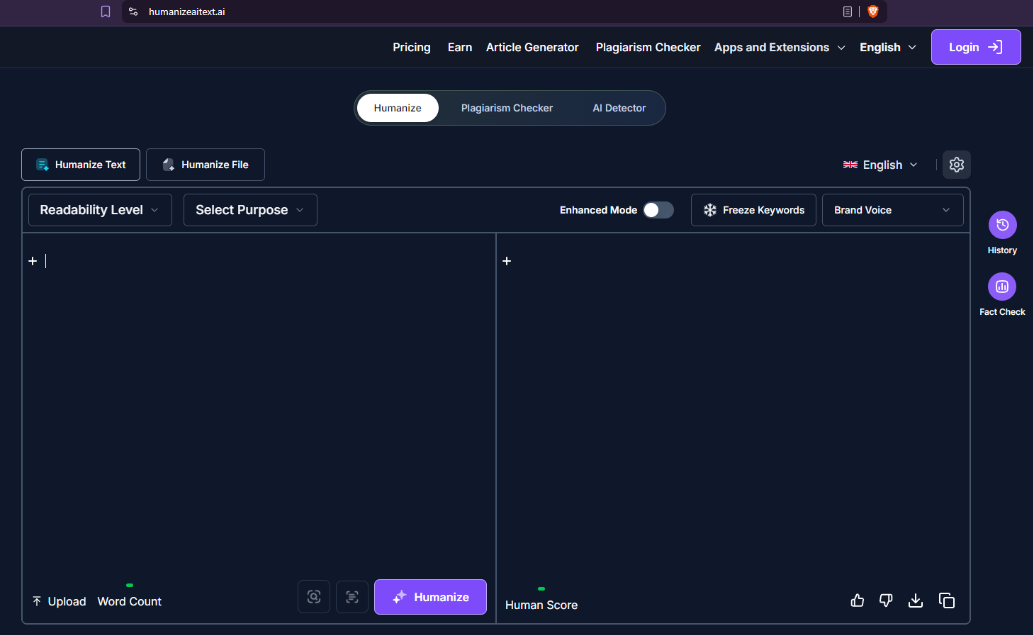
HumanizeAIText.ai-review-main-screen-view
As soon as you access the platform, you are greeted by a trio of tools. This smart placement ensures you get all you need without having to bounce between different platforms.
- HumanizeAIText.ai: As the name suggests, you use this one to add human nuance to AI-generated text.
- Plagiarism Checker: Yes, it does what the name says. Helps you check plagiarism.
- AI Detector: Check your content for AI telltales with this tool (works like a charm).
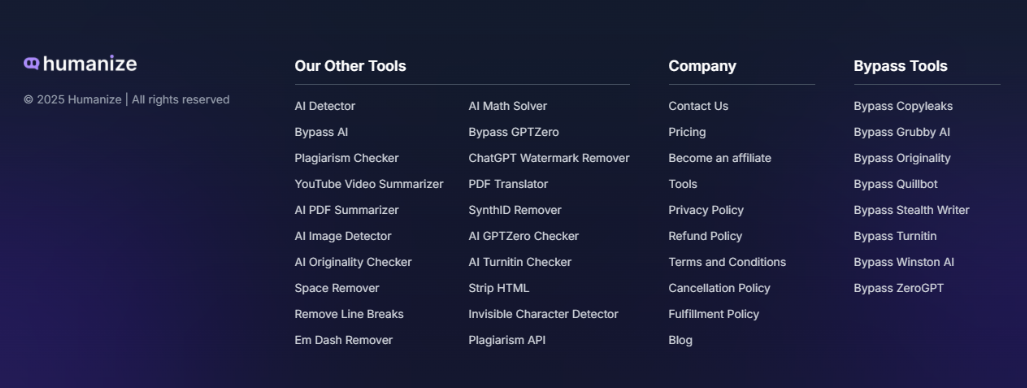
HumanizeAIText.ai-review-free-tools
Other than these core tools, HumanizeAIText.ai also offers a bunch of other solutions — some behind paywall and a lot of them for FREE (that’s cool if you ask me). Scroll down to the bottom of the homepage and you’ll be amazed at how many different (and really helpful) tools you can access here.
What HumanizeAIText.ai Actually Does?
HumanizeAIText.ai is an AI text rewriting tool with one primary job: take text generated by AI tools like ChatGPT, Gemini, or Claude and rewrite it so it reads more like a human wrote it.
The pitch is straightforward: AI-generated drafts tend to feel stiff, overly polished, and rhythmically uniform in ways that both readers and AI detectors can pick up on. This tool aims to sand those edges off. In fact, a lot of people are now actively trying to make ChatGPT sound more human instead of publishing raw AI output that instantly screams “generated.”
In practice, you paste your AI-written text into the left panel of a split-screen editor, configure a few options, and hit the purple "Humanize" button. The rewritten output appears in the right panel within roughly 5–10 seconds, along with a "Human Score" indicator. The interface also supports uploading PDF or Word documents directly, with the tool claiming to preserve the original formatting, such as fonts, headers, tables, and spacing, in the returned file.
Beyond the core rewriting function, the tool bundles in a few related utilities: a built-in AI Detector lets you check whether your content would be flagged, and a Plagiarism Checker is available for testing originality. There's also an Article Generator tucked into the nav.
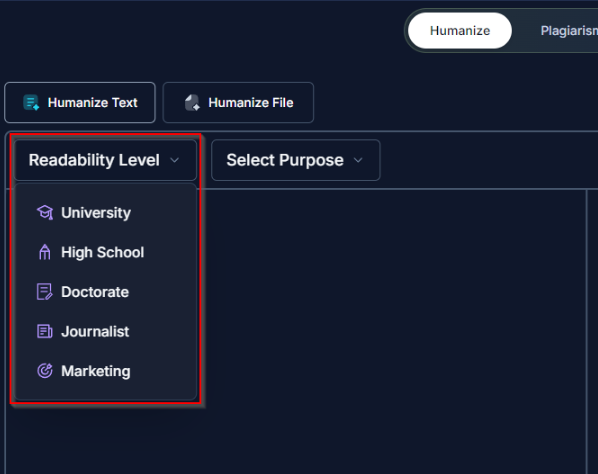
HumanizeAIText.ai-review-input-box
The editor itself offers more control than a simple text box. A "Readability Level" dropdown lets you target a specific audience register, while a "Select Purpose" menu lets you tailor the output to use cases like academic writing, blogging, or business copy.
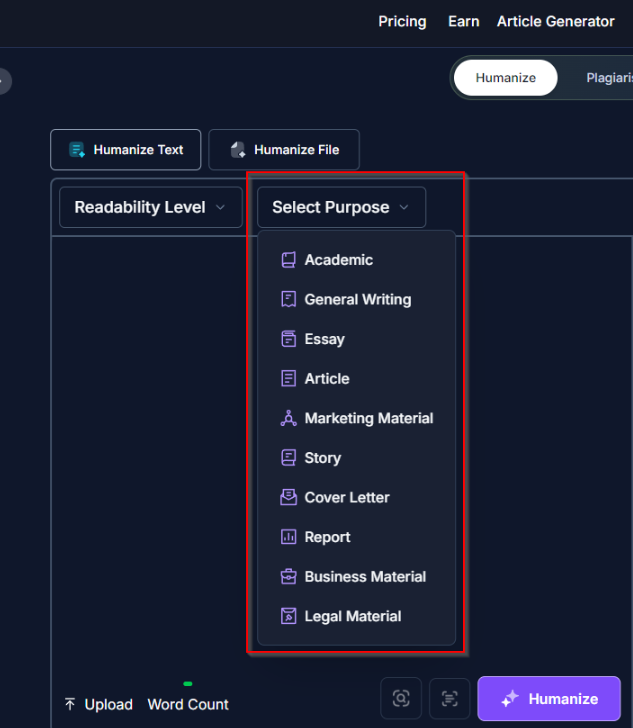
HUmanizeAIText.ai-review-features
"Freeze Keywords" preserves specific terms from being altered, which is super useful for SEO or branded language, and a "Brand Voice" option lets you feed in a persona for the tool to write toward. There's also an "Enhanced Mode" toggle, though the page doesn't spell out exactly what it changes.
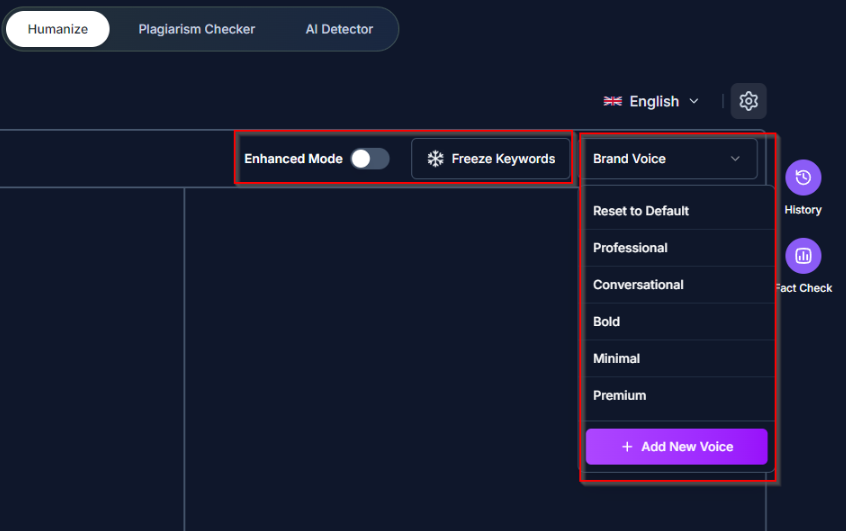
HumanizeAIText.ai-review-brand-voice-selection-feature
Five rewriting modes are available: Standard (general humanization), Shorten, Expand, Simplify, and Improve Writing. These map to common real-world needs — condensing a verbose AI draft, fleshing out a sparse outline, or cleaning up grammar and flow without changing the substance.
The Text Processing feature is another good-to-have add-on. It allows you to configure additional settings to make the humanized content even better.
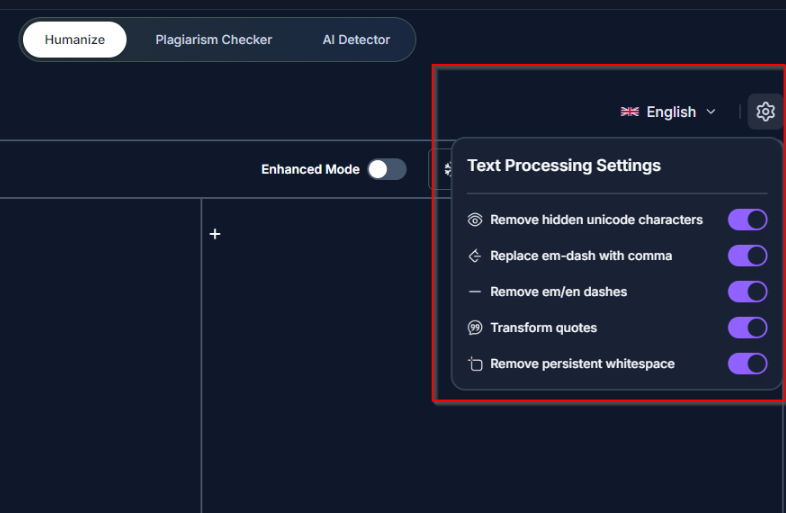
HumanizeAIText.ai-review-additional-settings
The tool supports over 25 languages, works in-browser without requiring account creation for the free tier, and positions itself primarily at students, freelance writers, marketers, and content teams who are using AI as a drafting tool but want the final output to pass both human and automated scrutiny.
Who Should Use HumanizeAIText.ai?
Based on my tests, I would say HumanizeAIText is a great tool that can come in handy for several use-cases. It’s a solution that can be extremely helpful for people who already use AI tools but want the output to stop sounding so painfully synthetic.
Here’s my personal take on who should give HumanizeAIText.ai a try:
Students trying to avoid robotic academic writing
A lot of students use ChatGPT for drafts, outlines, or research summaries now. That’s not even controversial anymore. The real problem starts when the final submission still sounds like an AI-generated encyclopedia article wearing a fake mustache.
HumanizeAIText.ai helps soften those obvious patterns:
- Repetitive sentence rhythm
- Stiff transitions
- Overly formal wording
- “As we delve into…” disease
That said, if you’re expecting one-click invisibility against every detector on Earth, calm down, Captain Academic Warfare. AI detectors are inconsistent, and no tool guarantees safety. But for making writing feel more natural? It helps.
Bloggers cleaning up AI-assisted drafts
This is probably one of the strongest use cases.
A lot of bloggers use AI to speed up research or rough drafts, but raw AI output still has that unmistakable “SEO intern possessed by Wikipedia” tone. HumanizeAIText.ai does a decent job reducing the robotic stiffness without completely wrecking readability.
Especially for:
- Informational blogs
- Comparison articles
- Listicles
- Product reviews
- Quick content refreshes
It’s much better at polishing functional content than emotional storytelling.
SEO agencies trying to scale content without sounding dead inside
SEO agencies are pumping out mountains of content now. Some of it’s great. Some of it reads like a committee of exhausted robots arguing over keyword density.
HumanizeAIText.ai makes sense here because it’s fast. You can clean up AI-generated drafts before editors touch them, which saves time during content production. This is also why so many content teams are now experimenting with specialized AI humanization tools for SEO writers instead of relying purely on raw ChatGPT drafts.
The bigger advantage is rhythm. A lot of AI writing fails because every sentence marches at the exact same pace like a tiny grammar dictatorship. This tool breaks that pattern better than many competitors. Still needs editing though. Always.
Affiliate marketers who need readable content fast
Affiliate content gets ugly fast when AI is involved.
You’ve probably seen those reviews: “This innovative product offers a seamless experience for modern users…”
Yup, nobody talks like that.
HumanizeAIText.ai helps strip out some of the fake-salesman language and makes reviews feel slightly more grounded. It won’t magically create personality, but it can stop your article from sounding like it was generated through a bad prompt.
That alone is valuable.
Freelance writers juggling speed and quality
Freelancers are under constant pressure to write faster without producing garbage. AI helps with speed. The downside is that clients increasingly recognize AI patterns even when they can’t explain why.
This tool works well as a cleanup layer:
- Rewrite stiff paragraphs
- Smooth transitions
- Reduce repetition
- Make AI-assisted drafts less obvious
Think of it like polishing the edges so you can deliver outstanding content each time (without getting called out for using AI—which you should obviously do).
Non-native English writers who want smoother flow
This might actually be one of the most practical use cases.
A lot of non-native English writers already know what they want to say. The issue is flow, phrasing, or sounding overly formal. HumanizeAIText.ai can help make writing feel more conversational without completely changing the original meaning.
And honestly, it often does a better job than generic grammar tools because it focuses more on rhythm and natural phrasing instead of just fixing commas like an angry English teacher from 2009.
What I Was Actually Looking for During Testing HumanizeAIText.ai
A lot of AI humanizer reviews obsess over one thing only: whether the content passes an AI detector.
That matters. Obviously.
But detector scores alone are a terrible way to judge writing quality because you can absolutely generate text that slips past detectors while still sounding like a corporate training manual written during a power outage.
So while testing HumanizeAIText.ai, I focused on a few different things:
AI detector performance
First, I wanted to see whether the rewritten content actually reduced AI detection scores across major platforms like GPTZero, Originality.ai, ZeroGPT, Winston AI, and Copyleaks.
Not just one detector. Multiple. Because relying on a single detector in 2026 is basically digital astrology at this point.
Most people assume these systems “understand” writing, but modern detectors are heavily pattern-based. This breakdown of how AI detectors work explains why the results can become wildly inconsistent.
Readability and flow
A lot of humanizers technically “work” but destroy readability in the process.
Some tools rewrite sentences so aggressively that the final output feels stitched together by a malfunctioning thesaurus. Others overcomplicate basic ideas just to avoid detection patterns.
HumanizeAIText.ai performed surprisingly well here. Most outputs still sounded smooth and readable instead of painfully engineered.
Tone preservation
This was a big one for me.
Could the tool preserve the original tone of the writing? Or would every piece eventually mutate into the same polished “professional” voice?
This matters more than people realize. Blog content, Reddit-style writing, product reviews, and academic writing all have different rhythms. A good humanizer should adapt without flattening everything into generic internet oatmeal.
Sentence rhythm and structure
Raw AI writing often has an unmistakable cadence.
Every sentence feels evenly spaced. Every paragraph moves with the same robotic pacing. After a while, your brain starts recognizing the pattern even if you can’t explain why.
One thing I noticed during testing was that HumanizeAIText.ai did a decent job breaking up that rhythm naturally, especially when using conversational or journalist-style readability settings.
Whether the output still sounded human
This was the most important test.
Not: “Did the detector score drop?”
But: “Would a normal person actually write this?”
Because there’s no point bypassing AI detection if the final paragraph sounds like a motivational LinkedIn post written by an HR department trapped in an elevator.
And honestly, this is where most humanizers fail. They focus so hard on avoiding detection patterns that they accidentally remove the natural imperfections that make human writing feel believable in the first place.
HumanizeAIText.ai Review: The Tests I Ran
Okay, now comes the best part. This is where we diagnose the actual worth of the tool. To be clear, I tested HumanizeAIText.ai using their highest paid plan (Scale). It costs $35/month… but the price tag justifies the features you get access to (we will talk about the pricing later).
Anyway, so I had ChatGPT, Gemini, and Claude generate some content across various edge cases, including:
- Blog intro
- Informational paragraph
- Product Review
Test Case #1: Blog Intro via Gemini
I used Gemini to generate an intro section for a blog. The prompt I used was “Write a blog introduction about why AI detectors are becoming unreliable in 2026. Keep it informative and SEO-friendly.”
And guess what? Given my lame prompt, the output was weak. Then, I edited the output to add some of my words and ran the modified content via the AI Detector to see how it works (and if it can actually detect).
I’m not even kidding here — the tool actually got it right. Don’t believe me? See for yourself:
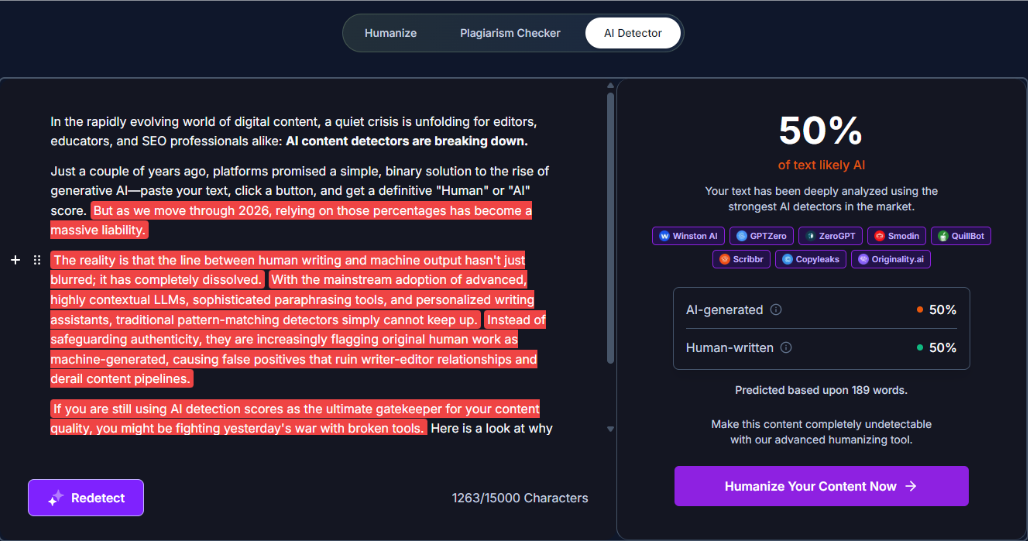
HumanizeAIText.ai-review-AI-detection-test
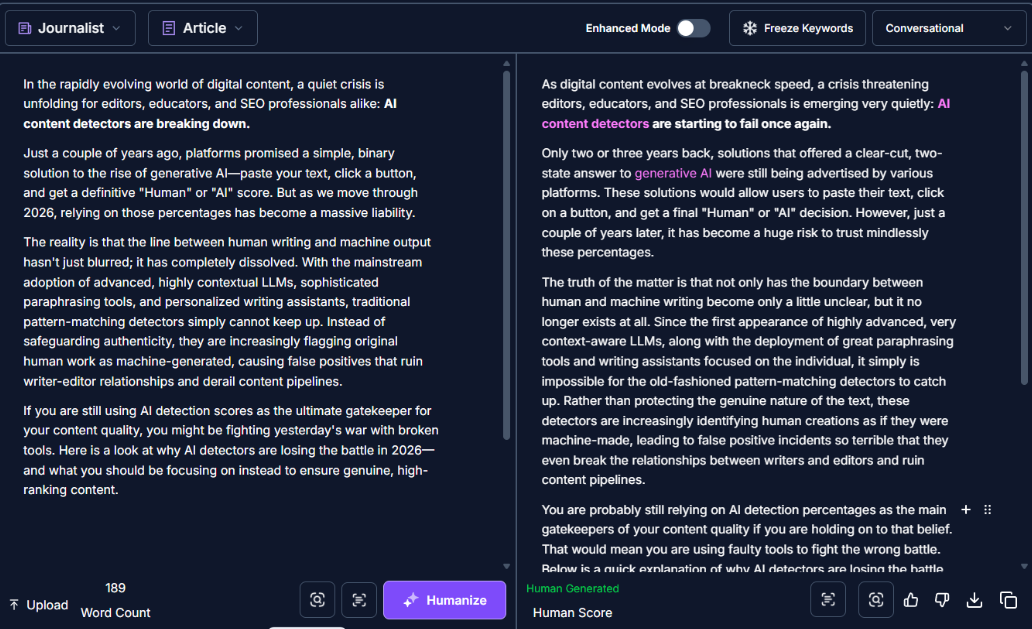
So, the next logical thing to try was to “Humanize” the content. To get the desired output, I tweaked some settings:
- Readability Level: Journalist.
- Purpose: Article
- Freeze Keywords: AI content detectors, generative AI
- Brand Voice: Conversational
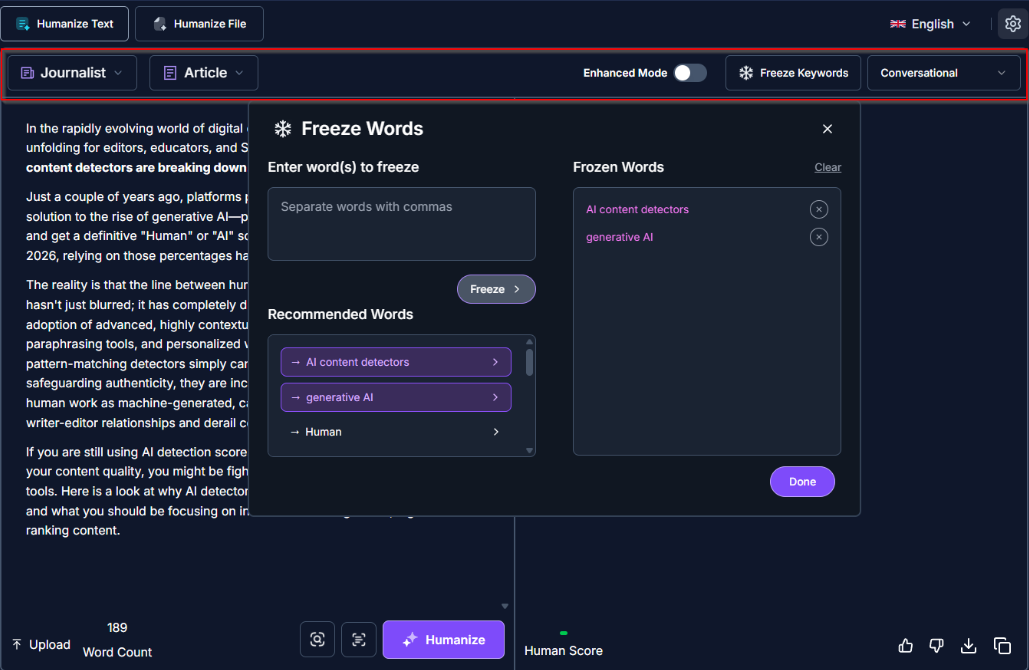
HumanizeAIText.ai-review-test-sample-1
The tool did its job — and it did it damn well! The output was extremely natural, and sounded like a journalist. Plus, the HumanizeAIText.ai tool went ahead and checked it against a bunch of AI detectors to ensure it was “human”. I mean it referenced GPTZero, Originality.ai, Turnitin, ZeroGPT, Winston AI, Crossplag, Copyleaks, BrandWell, Quillbot, Sapling, and Scribbr.
Take a look at this rewritten… umm humanized content. And, the best part? It kept my keywords intact. It maintained the core essence of what I was trying to say. Sure, the output needs some fine-tuning from an actual human…still, imagine the time (and effort) you can save with HumanizeAIText.ai, especially if you’re working in an industry where time equals money.
HumanizeAIText.ai-review-test-sample-2
Test Case #2: Informational paragraph
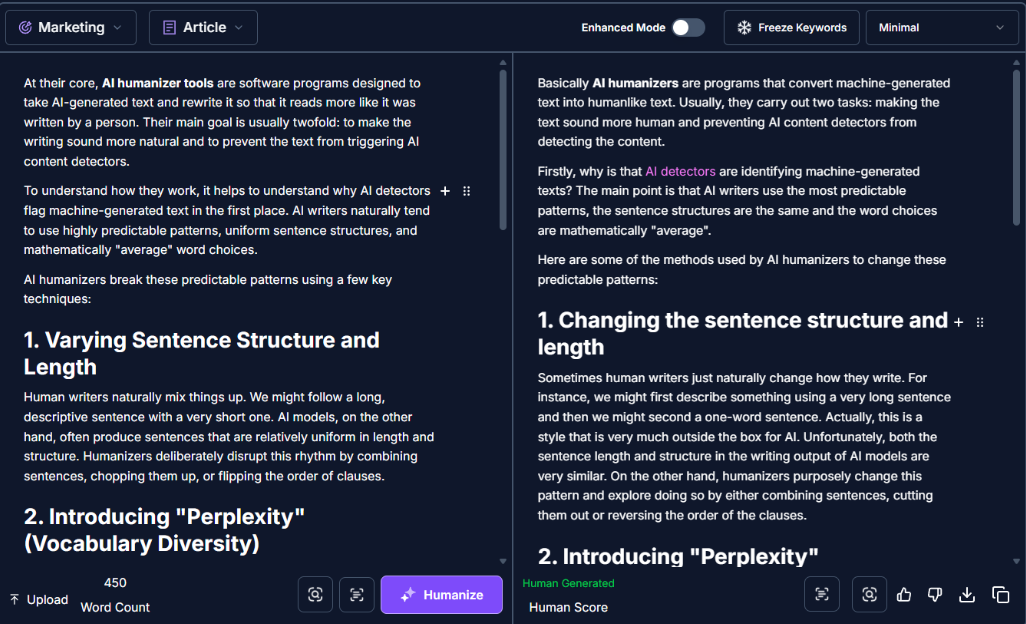
For this, I picked a few paragraphs one of our writers generated using their personal skills.md file. The output that they provided had all the human nuances (because they had already done the first level of editing). Still, I wanted to give HumanizeAIText a spin and see how it delivers long-form content.
HumanizeAIText.ai-review-test-sample-3
I also picked different reading levels, purposes, and brand voices for this. The output was better than I had expected (and I am not even glazing the tool to be honest). It kept the core messaging intact but restructured the content in a very natural way—and the difference was noticeable.
Again, the tool did a great job. But that doesn’t mean you can simply copy-paste the output and call it a day. You’ll need to spend some time formatting the text, splitting longer paragraphs into smaller bits, and reviewing the whole thing.
Nonetheless, this can save you a lot of time and effort. There’s no denying that part!
Test Case #3: Product Review
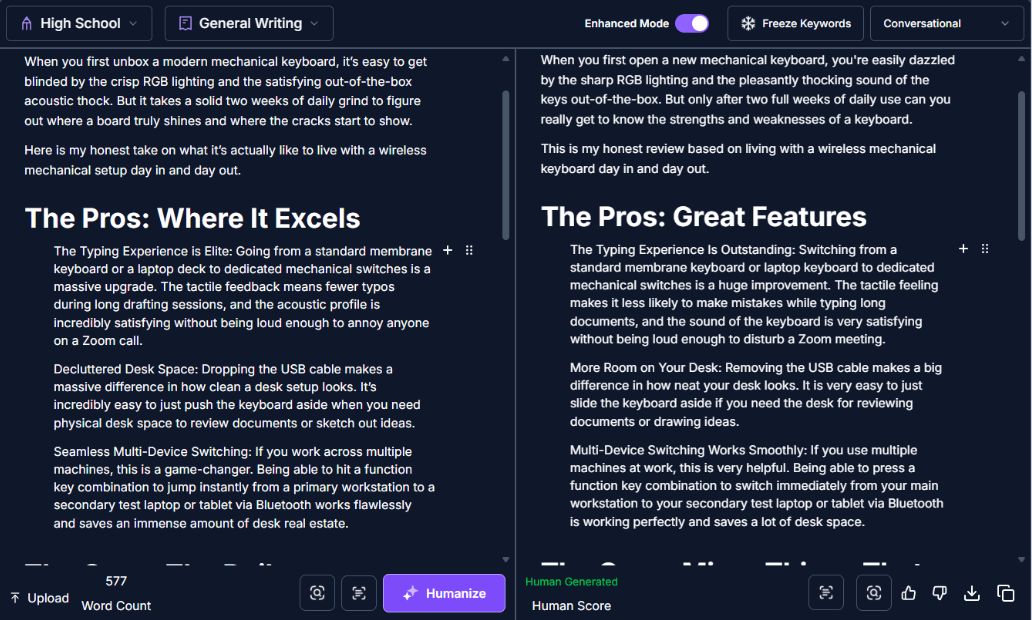
This one was a bit more complex than the first two tests. I picked a detailed Amazon review written by a real user for a mechanical keyboard, and ran it through the HumanizeAIText.ai tool. It was a very detailed and personalized review, which was already very human-like. My goal was to make it conversational.
I didn’t tweak a lot of settings for this one, just changed the readability level to high school, purpose to general writing, and voice to conversational. Also, this time I turned on the “enhanced mode.”
HumanizeAIText.ai-review-test-sample-4
Again, not much to complain about here. The output is decent. You can see the conversational approach and the structured, coherent flow. The tone is confident, friendly, direct, and easy enough for anyone to understand (even if you aren’t a keyboard nerd—which is one of the standout things I noticed in this test case).
The Best Settings Combo for HumanizeAIText.ai I Found During Testing
After running multiple test cases, I noticed certain combinations consistently produced better outputs depending on the content type.
Some settings felt way more natural than others.
For blog content
This combo produced the cleanest balance between readability and conversational tone.
- Readability Level: Journalist
- Purpose: Article
- Brand Voice: Conversational
- Freeze Keywords: Enabled
This setup worked especially well for SEO-style blog intros and informational content because it preserved important keywords while softening the robotic sentence flow.
For informational content
This setup handled educational or explanatory writing surprisingly well.
- Readability Level: University
- Purpose: General Writing
- Brand Voice: Professional
- Enhanced Mode: Enabled
The output stayed structured and informative without sounding painfully stiff.
For product reviews
This was probably my favorite setup overall.
- Readability Level: High School
- Purpose: General Writing
- Brand Voice: Conversational
- Enhanced Mode: Enabled
The rewritten reviews felt much more natural and easier to read without losing the original opinions or product details.
For academic-style writing
This one was tricky because academic writing naturally triggers detectors more often due to its formal structure.
Still, this setup gave the best balance:
- Readability Level: University
- Purpose: Essay
- Brand Voice: Professional
- Freeze Keywords: Enabled
The tool reduced some of the robotic phrasing while keeping the tone appropriately formal.
HumanizeAIText.ai Review: The Results Are Better Than You Expect (Well, In Most Cases)
So naturally, the next step was testing the rewritten outputs against other AI detectors. And this is where things got weird.
Because if there’s one thing I learned during this entire experiment, it’s that AI detection tools behave less like forensic science and more like caffeinated casino machines. The same paragraph can get wildly different scores depending on which detector you use.
Still, after running HumanizeAIText.ai outputs through multiple detection systems, the overall results were surprisingly strong.
Here’s the aggregate breakdown across all the test cases I ran:
| Tool | Human-written Score | AI-generated score |
|---|---|---|
| Quillbot | 81% | 19% |
| ZeroGPT | 100% | 0% |
| Copyleaks | 97% | 3% |
| GPTZero | 76% | 24% |
| HumanizeAI Pro | 100% | 0% |
| Turnitin | 90% | 10% |
| OriginalityAI | 100% | 0% |
| Crossplag | 72% | 28% |
| Sapling.ai | 100% | 0% |
| WinstonAI | 88% | 12% |
Now, before anyone starts screaming “AI detectors defeated forever,” relax for a second. These scores don’t mean the tool magically makes AI writing invisible.
Detection systems constantly disagree with each other, and their results can shift depending on writing style, formatting, sentence structure, or even how formal the content sounds.
Academic-style writing, for example, triggered detectors much more aggressively during my tests compared to conversational or blog-style content. Meanwhile, casual writing often passed with surprisingly low AI scores even before heavy editing.
That said, the consistency here is still impressive. GPTZero was one of the stricter systems during my tests, which matches a lot of the behavior discussed in this deeper guide on the GPTZero AI text detector.
HumanizeAIText.ai performed especially well at reducing obvious AI patterns like repetitive sentence rhythm, stiff transitions, and over-structured phrasing. More importantly, most of the rewritten content still sounded readable instead of collapsing into awkward synonym soup.
That balance is harder to achieve than people think.
A lot of AI humanizers can lower detection scores. Fewer tools manage to do it without making the writing sound like a customer service chatbot trying to write poetry at 3AM.
Where HumanizeAIText.ai Starts Struggling
Now, let’s discuss the areas where I felt HumanizeAIText.ai has room for improvement.
Emotional storytelling still feels slightly artificial
The tool does a great job improving readability, but emotional realism is much harder to fake.
When you feed it writing packed with emotional nuance, personal storytelling, humor, or sarcasm, it tends to smooth out the edges a little too aggressively. The rewrites become cleaner, but also safer.
That’s great for clarity. Not always great for personality.
A few times during testing, I noticed emotionally charged writing losing its natural tension. Jokes became flatter. Sarcasm became more literal. Personal stories started sounding less like someone venting and more like someone carefully editing a LinkedIn post before HR sees it.
If you write highly emotional or personality-driven content, you’ll probably still want to manually tweak the final output.
Long-form content still needs manual editing
If you’re expecting to dump a 3,000-word article into the tool and instantly get back a flawless publish-ready masterpiece, reality arrives pretty quickly.
Long-form content is where the cracks start becoming more visible.
The biggest issues I noticed were:
- occasional repetition across sections
- pacing drift in longer paragraphs
- transitions that felt slightly too structured
- sentence rhythm becoming repetitive over time
Most of these problems are manageable, but they become easier to notice the longer the content gets.
The tool is much stronger as a cleanup layer than a one-click publishing machine. You still need human editing to tighten pacing, break up sections, and preserve a natural voice throughout longer articles.
Some rewrites become too polished
Sometimes HumanizeAIText.ai tries a little too hard to sound professional.
Ironically, this creates another detectable pattern: perfectly grammatical sentences that technically read well but feel strangely lifeless.
You’ll occasionally see unnecessary synonym swaps or wording that feels slightly over-engineered. A simple sentence can suddenly sound more corporate than conversational, especially when using certain readability settings.
It’s not disastrous. Most outputs were still solid.
But every now and then, the writing drifts into what I can only describe as “corporate oatmeal” territory. Smooth. Clean. Professional. Completely forgettable.
And honestly, that’s one of the biggest challenges with AI humanization in general. The more aggressively a tool tries to eliminate AI fingerprints, the easier it becomes to accidentally erase personality too.
That said, I still want to underline one critical thing: AI detectors aren’t 100% reliable, and the same goes for AI humanizers. HumanizeAIText.ai is no exception. While it can help improve your scores, AI detectors themselves are inherently unreliable.
My biggest takeaway after all these tests?
Do not treat HumanizeAIText.ai like magical invisibility software for Turnitin or AI detectors. Instead, use it to improve readability, clean up robotic phrasing, and make AI-assisted writing feel more natural. That’s where the tool genuinely performs well. But if your entire strategy depends on chasing green detector scores forever, welcome to the world’s most exhausting game of algorithmic whack-a-mole.
This is especially important in academic environments where tools like Turnitin can still produce false positives, which is something I covered more deeply in this article on the AI Turnitin detector.
HumanizeAIText.ai Pricing: The Good and The Bad
One thing I appreciated during testing is that HumanizeAIText.ai doesn’t completely cripple the free version into unusable bait. You can actually test the tool properly before paying, which already puts it ahead of a surprising number of AI writing platforms that slap a paywall on literally everything except the homepage.
HumanizeAIText.ai-review-pricing
That said, the limitations become obvious pretty quickly once you start using the tool seriously. Sure, you get a taste of the tool when you sign-up. However, a lot of the features that genuinely improve the output quality are locked behind the paid plans, including:
- Advanced readability levels
- Purpose-based rewriting
- Enhanced mode
- Premium engines
- Higher word limits
- Stronger AI detector evasion settings
And honestly? That distinction matters more than the marketing copy suggests. During my testing, the best results usually came from combinations like:
- Journalist readability
- Conversational brand voice
- Freeze Keywords
- Enhanced Mode
Those settings noticeably improved flow and made the writing feel less robotic. If you stay entirely on the free tier, you are not really getting the “full” HumanizeAIText.ai experience. Plus, the pricing itself is fairly competitive compared to other AI humanizers floating around right now.
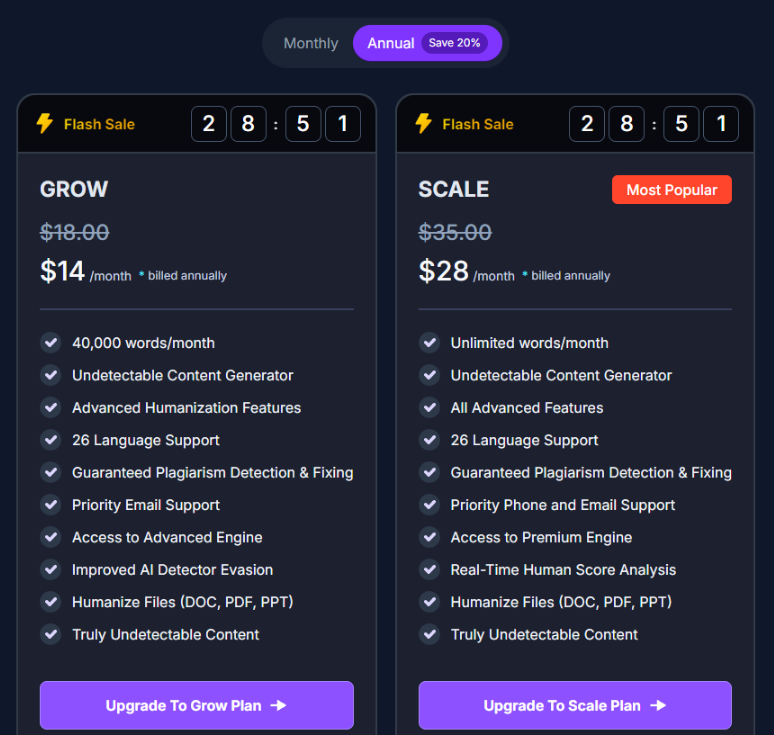
The two main paid plans are:
| Plan | Price | Main Limitation / Benefit |
|---|---|---|
| Grow | $14/month billed annually | 40,000 words/month with advanced features |
| Scale | $28/month billed annually | Unlimited words + premium engine access |
The Scale plan is the one I used for most of my testing, mainly because it unlocks the advanced controls that actually make the tool interesting in the first place.
Would I call it cheap? Not really. Still, compared to some competitors charging absurd prices for glorified synonym shuffling, the pricing feels relatively reasonable if you are actively producing content every week.
So, Who Should Actually Pay for HumanizeAIText.ai?
After all the testing, detector checks, weird rewrites, and existential conversations with AI-generated paragraphs at 2AM, I think the answer really depends on how often you work with AI-assisted content.
Because despite all the marketing around “undetectable AI,” this tool makes the most sense as a workflow improvement tool, not a magical invisibility cloak for the internet.
Students already using AI for drafting
If you already use ChatGPT, Gemini, or Claude to help brainstorm outlines, summarize research, or draft rough sections, HumanizeAIText.ai can genuinely help make the final writing feel more natural.
It does a good job reducing:
- robotic phrasing
- repetitive sentence rhythm
- overly formal wording
- stiff transitions
But here’s the important part: do not treat it like guaranteed protection against Turnitin or AI detectors.
That mindset is exactly how people end up panicking at 3AM after uploading essays into five different detectors like they’re checking lottery numbers.
Use it to improve readability and flow. Not as a “make me invisible forever” machine.
Bloggers and affiliate marketers will probably get the most value
Honestly, this is where HumanizeAIText.ai shines the most.
Bloggers, niche site owners, affiliate marketers, and SEO writers constantly deal with one huge problem: AI-generated drafts often sound technically correct but painfully lifeless.
That weird “SEO intern possessed by Wikipedia” tone shows up everywhere now.
HumanizeAIText.ai helps clean up:
- repetitive wording
- robotic pacing
- generic AI phrasing
- awkward transitions
The Freeze Keywords feature alone is incredibly useful if you care about SEO because it prevents important terms from getting rewritten into bizarre synonyms that quietly destroy optimization.
And since the tool works pretty fast, it fits nicely into high-volume content workflows where speed actually matters.
SEO agencies producing content at scale
Agencies pumping out dozens of articles every week will probably get the most value from the Scale plan.
Not because the tool magically replaces editors. It absolutely does not.
But it can reduce cleanup time significantly before human editors step in.
That distinction matters.
If your workflow already involves:
- AI-assisted drafting
- human editing
- SEO optimization
- content scaling
…then HumanizeAIText.ai becomes useful as a middle-layer cleanup tool.
It smooths out the obvious AI fingerprints before editors spend time polishing tone, structure, and strategy.
And honestly, in agency environments where time literally equals money, that efficiency adds up fast.
Freelancers working under brutal deadlines
Freelancers live in a constant battle between:
“I need to finish this quickly” and “I refuse to submit robotic garbage.”
HumanizeAIText.ai actually fits that workflow surprisingly well.
Instead of manually rewriting every stiff AI-generated paragraph from scratch, the tool helps accelerate cleanup while preserving most of the original meaning.
You still need editing. Absolutely.
But the amount of cleanup work becomes much smaller compared to raw ChatGPT output.
Casual users probably do not need the paid plans
This is the part most reviews conveniently avoid saying.
If you only occasionally use AI tools, the free version is probably enough.
Seriously.
The paid plans become worth it mainly when:
- you create content regularly
- you work with long-form AI drafts
- you need advanced readability controls
- you care about SEO optimization
- you process large word counts weekly
Otherwise, the Scale plan is probably overkill for the average person casually rewriting emails or social captions once in a while.
And honestly, that’s fine. Not every tool needs to be for everyone.
Final Verdict: HumanizeAIText.ai Works Better than Most, but the AI Detector Industry is Still Weird
After spending way too much time testing detectors, tweaking readability settings, comparing rewrites, and watching AI tools accuse perfectly normal paragraphs of being synthetic, I came away with a pretty clear conclusion:
HumanizeAIText.ai is one of the better AI humanizers I’ve tested. Not because it magically makes AI content invisible forever. Nothing really does. But because it solves the more practical problem: making AI-assisted writing sound less painfully robotic.
That distinction matters.
A lot of competing tools focus so aggressively on “bypassing detection” that they completely destroy readability in the process. You end up with content that technically scores better but reads like someone translated English through six different dimensions and back.
HumanizeAIText.ai usually avoids that trap.
The outputs are generally readable, structured, and surprisingly natural, especially when using the right combinations of:
- Readability levels
- Conversational brand voice
- Freeze keywords
- Enhanced mode
It also helps that the interface is clean, fast, and doesn’t feel like a sketchy crypto casino pretending to be a writing platform.
That said, the tool still struggles with emotional nuance, storytelling, humor, and highly personality-driven writing. Long-form content also needs manual cleanup if you care about maintaining a strong human voice throughout the entire piece.
And honestly? That’s probably unavoidable right now.
Because the funniest part of the entire AI detection industry is this: Most human writing online is usually slightly imperfect.
Real people ramble sometimes. They repeat themselves. They change rhythm mid-thought. They make weird jokes. They write emotionally instead of mechanically.
AI detectors still struggle with that reality.
So if you treat HumanizeAIText.ai as a readability enhancement tool rather than some magical anti-detection forcefield, you’ll probably have a much better experience with it.
Would I use it again? Yeah. Probably.
Would I blindly trust detector scores afterward? Absolutely not.
FAQs
Does HumanizeAIText.ai actually bypass AI detectors?
Sometimes, yes. During my testing, HumanizeAIText.ai significantly reduced AI detection scores across tools like GPTZero, ZeroGPT, Winston AI, and Copyleaks. That said, no AI humanizer can guarantee permanent invisibility because detectors constantly change their algorithms and frequently disagree with each other.
Is HumanizeAIText.ai free to use?
Yes, but the free version has limitations. You can test the tool without creating an account, which is genuinely useful, but many advanced features like readability levels, enhanced mode, premium engines, and higher word limits are locked behind the paid plans.
Is HumanizeAIText.ai better than StealthWriter?
In terms of readability, I would say yes in most cases. A lot of AI humanizers focus so aggressively on bypassing detectors that the final output becomes awkward or unnatural. HumanizeAIText.ai generally preserved flow and sentence rhythm better during my tests, especially for blog content and informational writing.
Can teachers detect content rewritten by HumanizeAIText.ai?
Possibly. AI detection systems are inconsistent, and schools often use multiple tools simultaneously. HumanizeAIText.ai can make AI-assisted writing sound more natural, but relying entirely on detector scores is risky because false positives and inconsistent results are still very common.
Does HumanizeAIText.ai work for SEO content?
Yes. In fact, SEO content is probably one of its strongest use cases. Features like Freeze Keywords, readability settings, and conversational brand voice help clean up robotic AI-generated blog drafts without completely destroying keyword optimization.
Does HumanizeAIText.ai remove plagiarism?
Not necessarily. HumanizeAIText.ai is primarily a rewriting and humanization tool, not a dedicated plagiarism remover. While rewriting can reduce duplicate phrasing, you should still run important content through the built-in plagiarism checker before publishing or submitting it.
Which HumanizeAIText.ai plan is worth it?
For casual users, the free plan is usually enough to experiment with. For bloggers, SEO writers, agencies, and freelancers regularly working with AI-assisted content, the Grow or Scale plans make more sense because they unlock advanced controls, higher limits, and better rewriting quality.
Is HumanizeAIText.ai worth paying for in 2026?
If you regularly work with AI-generated drafts, probably yes. The tool does a solid job improving readability, reducing robotic phrasing, and cleaning up AI writing patterns. Just don’t expect it to function like magical “undetectable AI” software forever because the entire detector ecosystem is still messy and inconsistent.
Should You Try HumanizeAIText.ai?
If you regularly work with AI-generated drafts and you’re tired of editing paragraphs that sound like they were written by a motivational toaster, HumanizeAIText.ai is honestly worth testing for yourself.
It’s not magic software. It won’t permanently defeat every AI detector on Earth. And it still needs human editing for the best results.
But compared to a lot of AI humanizers I’ve tested, it does a noticeably better job preserving readability while reducing the obvious robotic patterns that make AI-generated writing stick out.
HumanizeAIText.ai-review-sing-up-offer
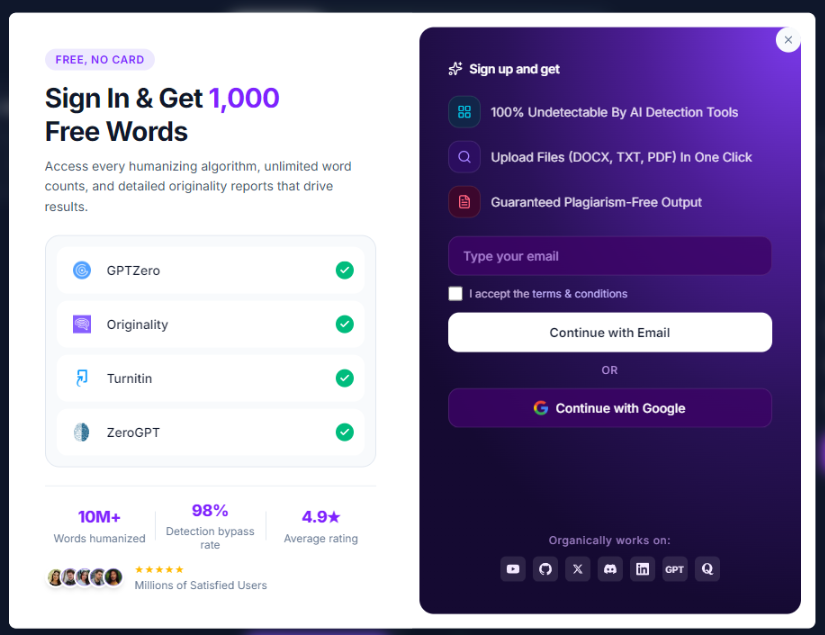
The free version is enough to experiment with, and if you’re producing content regularly for blogs, SEO, affiliate sites, or client work, the paid plans start making a lot more sense pretty quickly.
You can check out HumanizeAIText.ai here and test some of your own content through it. Just maybe don’t trust AI detectors like they’re ancient prophecy tablets carved into a mountain.
About the Author

Bishal is a senior SEO strategist, content researcher, and AI automation expert. He builds technical SEO strategies and custom n8n workflows for AI-native agencies. He also focuses on Generative Engine Optimization (GEO) to help brands adapt and dominate in today's AI-driven search landscape.