
You paste a ChatGPT draft into LinkedIn. Clean structure. Professional tone. Solid points. It pulls 11 likes and zero comments. Meanwhile, a colleague posts something rougher, less polished, half the length. 200 reactions. 40 replies. A recruiter DMs them.
The difference isn't the writing quality anymore. Ever since the platform introduced new updates, it's LinkedIn's algorithm now. Plus, LinkedIn's audience can tell when nobody actually wrote the post.
I've spent the last year testing this across client accounts and my own profile. What I've found is that humanizing AI text for LinkedIn is a detection problem more than it's a style exercise. And until you treat it like one, you'll keep publishing posts that look great and reach nobody.
Linkedin’s Algorithm Actively Suppresses AI-Sounding Content
LinkedIn replaced its legacy ranking system in late 2025 with 360Brew, a 150-billion-parameter foundation model that evaluates content, engagement patterns, and user behavior as a single unified system. The old algorithm counted likes. This one reads your post.
360Brew's NLP classifiers scan for patterns characteristic of AI-generated text. If your post triggers enough of those signals, it gets classified as low-effort content and distribution gets capped. Your post shows to a fraction of your first-degree connections. No second-wave distribution. No extended reach.
Here's the context that makes this matter: LinkedIn now has 1.3 billion members with approximately 310 million monthly active users. That's a massive audience you're losing access to when the algorithm throttles your post before it even gets a chance.
The suppression isn't theoretical. LinkedIn's own engineering team confirmed that posts flagged as low-effort AI receive reduced distribution. The algorithm doesn't just measure whether people engage. It measures how they engage.
Saves and shares carry more weight than likes in 2026. Likewise, comments with substance carry 3–5x more weight than "Great post!" replies. And posts that include a question get 77% more comments than those that don't.
AI-generated posts rarely earn saves. They almost never spark substantive comments. So the algorithm buries them.
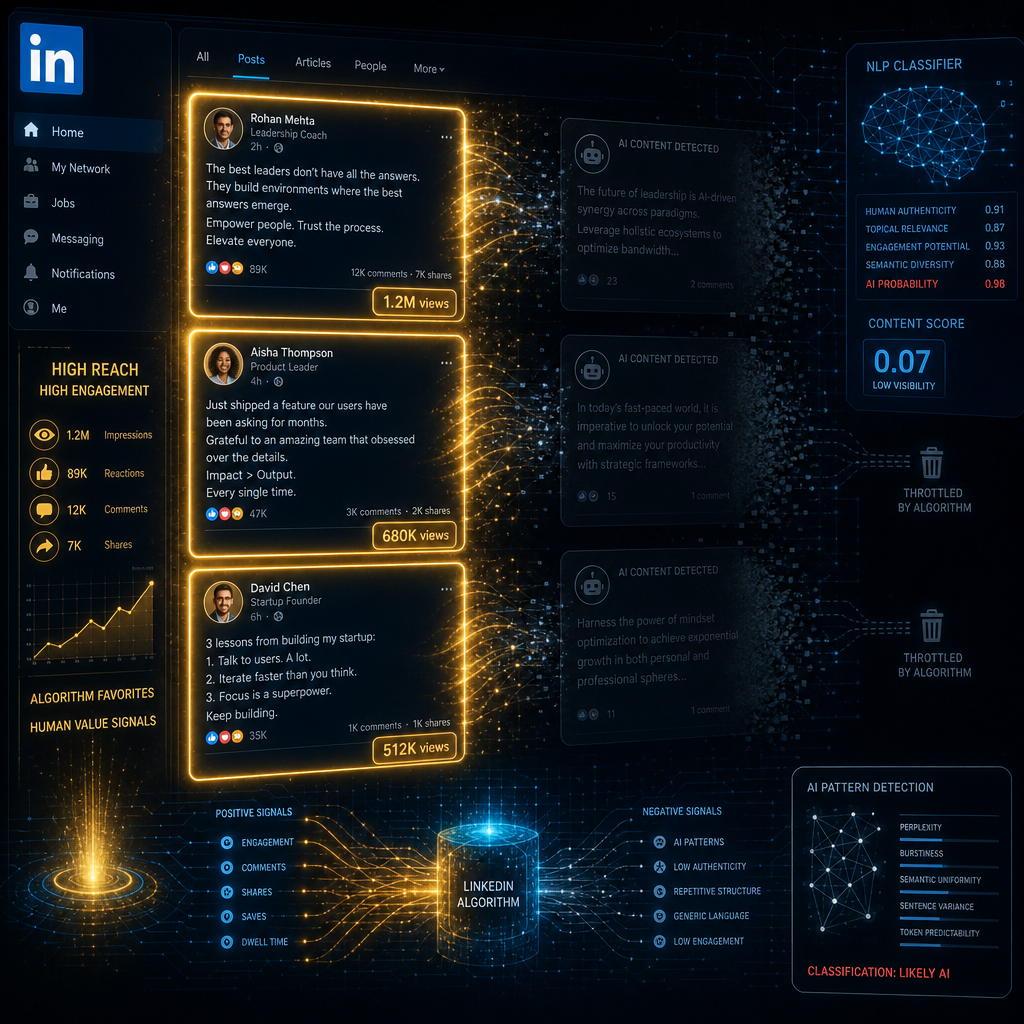
Linkedin posts viewed on a desktop
What AI-Generated LinkedIn Posts Look Like to the Algorithm
I'm not talking about obviously bad AI output. I'm talking about the polished, plausible kind that most professionals publish without a second thought. Here are the five patterns that get posts buried.
The "I'm excited to share" opener. This phrase, along with "I'm thrilled to announce" and "Here are X things I've learned," has become so strongly associated with AI-generated LinkedIn content that it functions as a flag. Readers scroll past it. The algorithm registers the scroll.
Symmetrical bullet lists. Three bullet points, each 12–15 words, each starting with the same grammatical structure. AI defaults to this. Humans almost never write this way naturally. Real lists have uneven items, odd numbers, and occasional sentences that break the pattern.
Uniform sentence length. Read your draft out loud. If every sentence runs 15–20 words with no variation, like no short punches, no fragments, no longer explanatory sentences, that's a problem. This rhythm signals AI-generated slop. Human prose alternates. Two words. Then a longer clause that builds the argument out. Then something medium.
Zero friction in the argument. AI wraps every point in a neat bow. Real professionals admit when something is hard, unresolved, or only partially worked. A post that moves from problem to solution without a single moment of doubt reads as synthetic.
Vague claims instead of specifics. "Many companies struggle with this challenge" is AI. "We missed our Q3 retention target by 22% because of this exact problem" is human. The specificity is what makes readers stop and believe you.
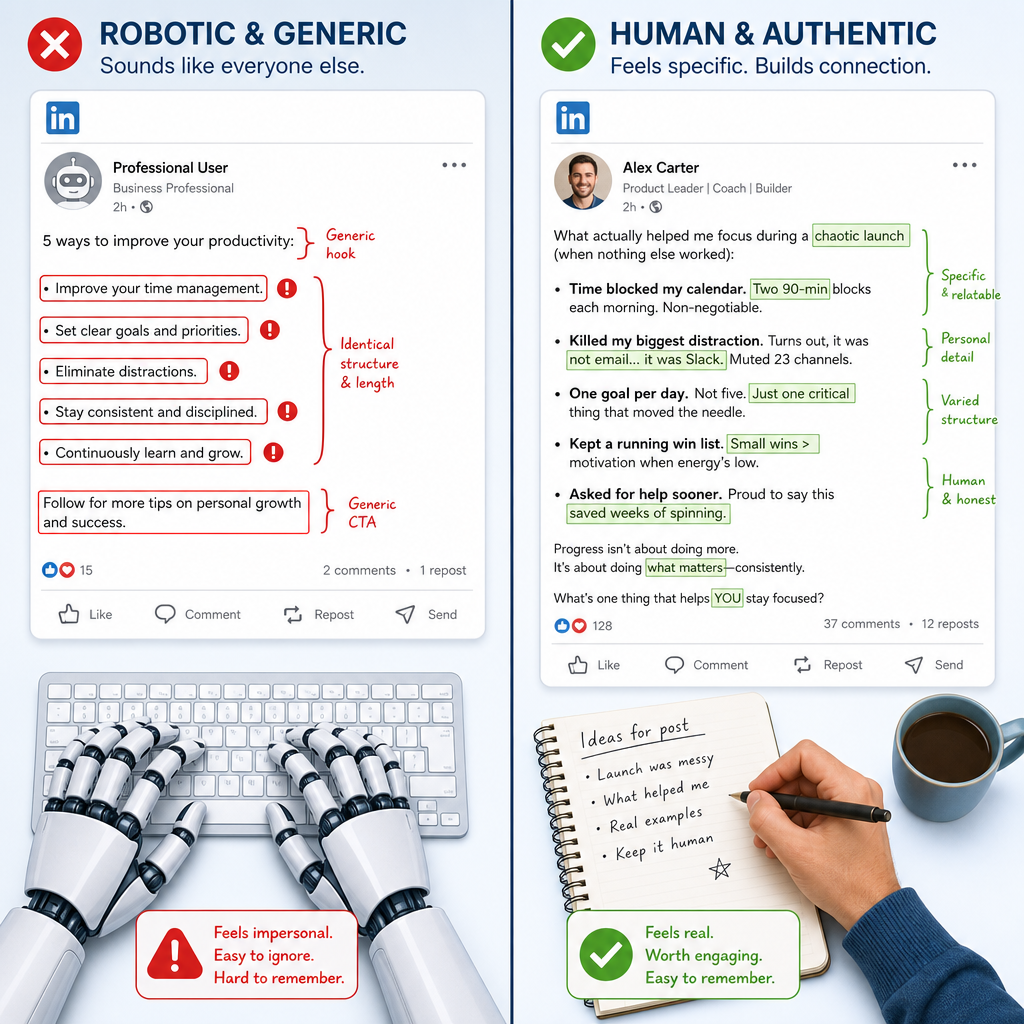
Comparing robotic vs authentic Linkedin posts from HumanizeAIText tool
The Detection-First Workflow I Use to Humanize AI Content for LinkedIn
Most advice tells you to "add your voice" to AI drafts. That's vague enough to be useless. Here's the actual system I run, and it starts with detection, not editing.
Step 1: Write with AI, but start from your own idea
Don't open ChatGPT and ask it to "write a LinkedIn post about leadership." Start with a specific observation, a real outcome, or an opinion you actually hold. Feed that to the AI as a seed. The difference between "write about leadership" and "expand on this idea: most managers confuse availability with accessibility, and the distinction costs them their best people" is the difference between generic and personal.
AI is the drafting engine. You are the idea source. Reverse that, and nothing downstream fixes it.
Step 2: Run it through an AI detector before you post
Don't guess whether your draft sounds robotic. Score it. Paste the text into an AI detector and look at the probability score. Above 70%? The structure needs work, not just the vocabulary. Above 85%? The draft is probably unsalvageable, so, it's best to rewrite from a different starting point.
The detector also highlights specific sentences driving the high score. Those sentences are your edit list. This is why detection comes before editing: you stop wasting time fixing paragraphs that were already fine.
Step 3: Humanize the flagged sections
Take the sentences the detector flagged and rewrite them. You can do this manually or run them through HumanizeAIText for a fast first pass. The tool handles sentence rhythm and word choice shifts. But the bigger fixes, such as adding specifics, injecting an opinion, breaking a too-neat argument, are human work.
If you're doing this at scale across multiple client accounts, AI humanization tools built for marketing professionals approach the problem differently than general-purpose rewriters. They preserve brand voice and argument structure while stripping the AI fingerprints.
Step 4: Add one line only you could write
After humanizing, add one sentence that contains something no AI could generate: a real number from your business, a specific person's name (if appropriate), a counterintuitive outcome you experienced, or a detail that only someone who actually did the work would know.
This single line does more for authenticity than every other edit combined. It's your proof-of-experience marker.
Step 5: Cut the generic closer and re-check
Delete whatever version of "What do you think? I'd love to hear your thoughts in the comments!" your draft contains. That closer is the most recognized AI pattern on LinkedIn. End on a specific question that doesn't have an obvious answer, a strong statement, or just stop. Authentic posts don't beg for engagement.
Run the edited version through the detector one more time. You should see the score drop below 40%. If it hasn't, go back to the flagged sentences from step 2 and rewrite them again.
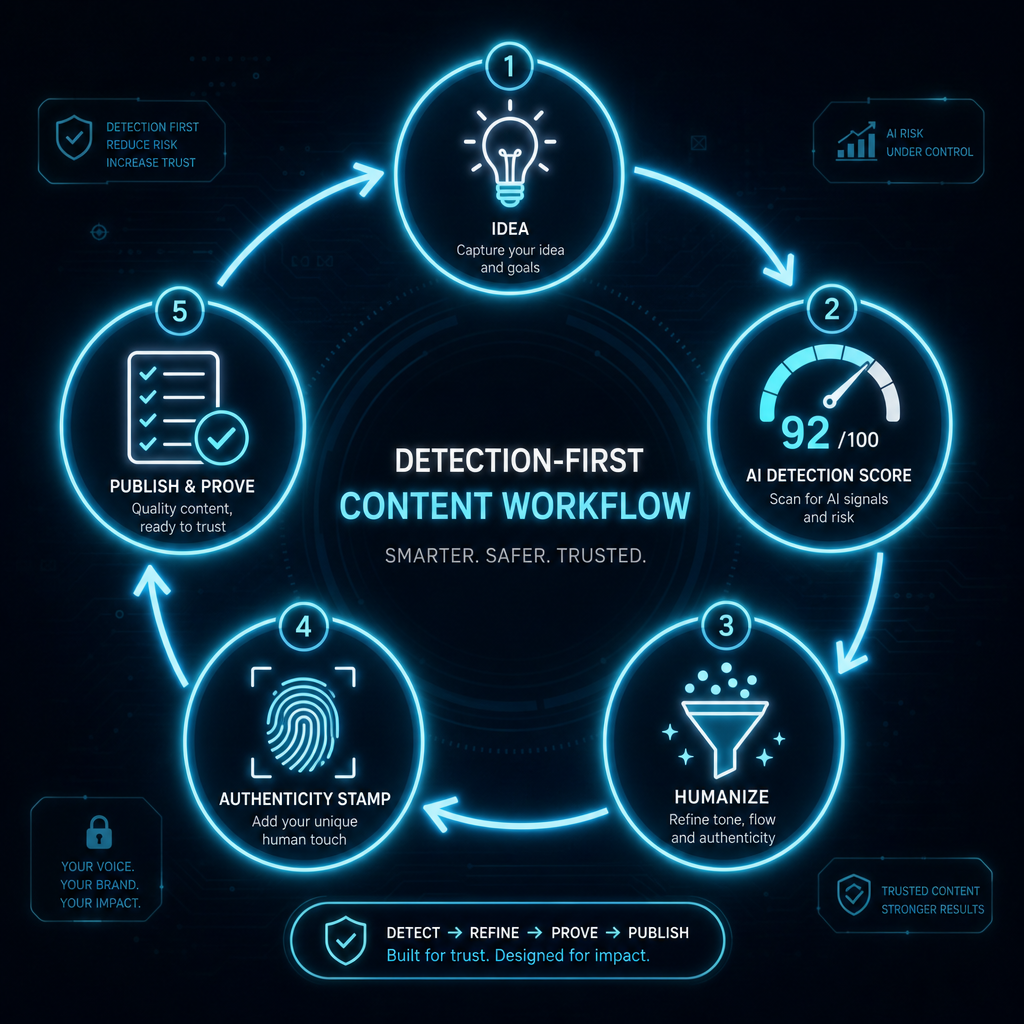
Flowchart showing how to create original non-AI Linkedin posts
Before and After: What the Detector Sees vs. What Your Audience Reads
| Element | Raw AI draft | After detection-first workflow |
|---|---|---|
| Opener | "I'm excited to share key insights from my decade in product management!" | "The honest version of product management: you spend 60% of your time explaining why the thing you shipped isn't the thing anyone asked for." |
| Structure | Three perfectly parallel bullets, each 14 words | One short sentence. One longer explanation. A question. An uneven list of four items. |
| Specificity | "Achieved remarkable results and delivered exceptional value" | "Reduced onboarding time from 23 days to 9, which accidentally broke our support ticket routing" |
| Closer | "What strategies have worked for you? I'd love to hear your thoughts below!" | "Curious if anyone's found a way around the translation problem, or if it's just a permanent feature of the job." |
| AI detection score | 92% AI probability | 28% AI probability |
The second version isn't longer. It's not more polished. It's more human... and that's what the algorithm rewards with reach.
Quick-Reference Checklist for Writing LinkedIn Posts With AI
Run through this before you hit publish.
- Voice checks: Does the post contain at least one opinion you'd defend in person? Is there a specific number, name, or date? Could someone in your industry tell this was written by you, not just by someone?
- Structure checks: Do sentence lengths vary? Is there at least one sentence under five words? Do you have any list with more or fewer than three items? Is there a moment where you admit something is hard, unresolved, or imperfect?
- Pattern checks: No "I'm excited to share" or any variation. No emoji bullets (the rocket, the checkmark, the lightbulb). No "In today's fast-paced world." No closing that asks people to "drop a comment."
- Detection check: AI probability below 40% on your detector. If it's higher, the structure still needs work.
Engagement check: Does the post end with a genuine question; a real one not a rhetorical line? If not, you may want to rethink and redo it before posting to Linkedin.
If you need more clarity with the tools you should use to craft epic Linkedin posts, make sure to check out our blog on the best AI humanization tools For professional and business writing.
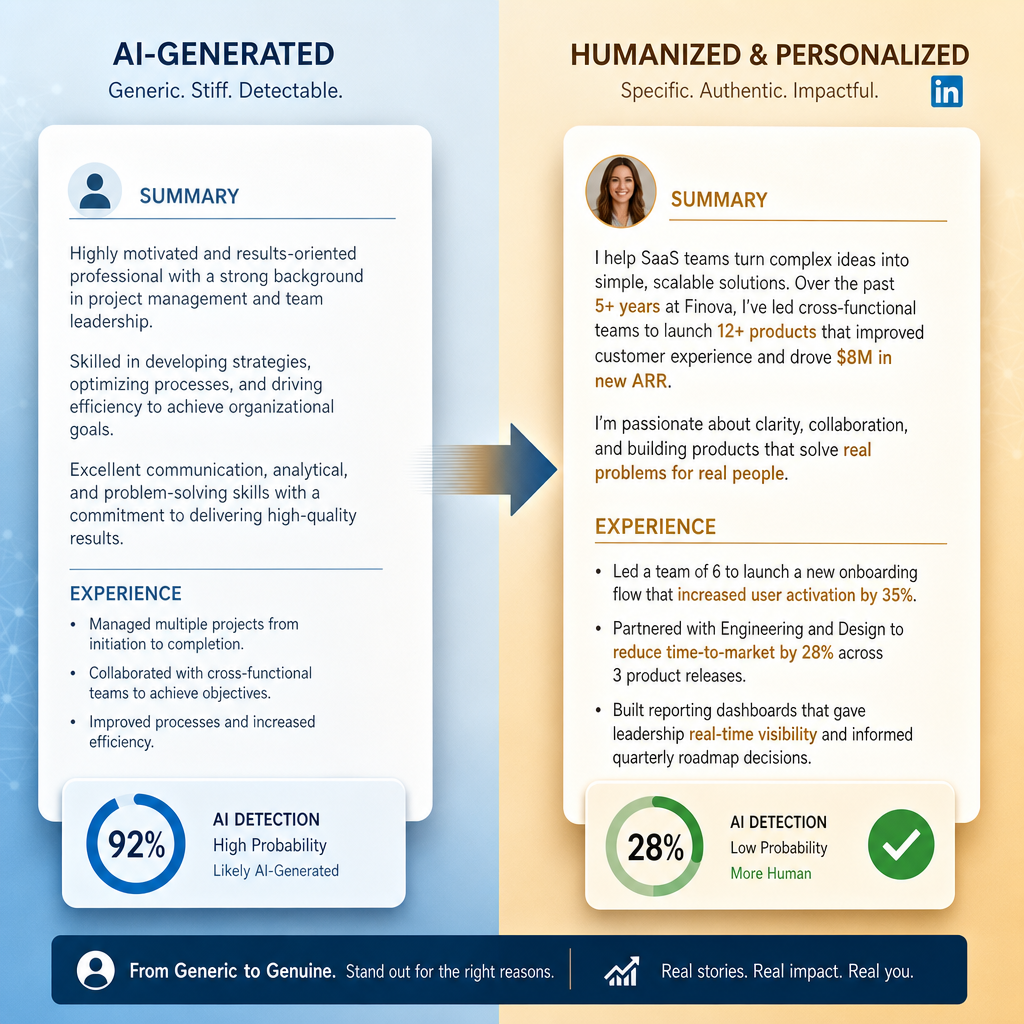
AI-generated vs HumanizeAIText Linkedin post comparison
FAQs
Does LinkedIn detect AI-generated content?
LinkedIn doesn't publicly confirm a standalone AI detection filter. But its 360Brew algorithm uses NLP classifiers that identify patterns characteristic of AI-generated text, such as uniform sentence lengths, predictable transitions, generic phrasing, and suppresses their distribution. The practical effect is identical: AI-sounding posts reach fewer people, earn fewer saves and comments, and get buried in the feed within hours.
Can I use ChatGPT for LinkedIn posts without getting flagged?
Yes, but only if you treat ChatGPT as a drafting tool, not a publisher. Write from your own idea, run the draft through an AI detector, humanize the flagged sections, and add details only you could know. The AI gives you speed. The human editing gives you reach.
What's the best AI humanizer for LinkedIn?
The best humanizer handles sentence rhythm and structural variation, not just synonym swaps. Tools like HumanizeAIText.ai reduce AI probability scores while preserving your core argument. But no tool replaces the one-line specificity test: if a sentence could have been written by anyone, it needs your fingerprint on it.
How do I make AI-written LinkedIn posts sound more personal?
Start from a specific experience, not a topic. Rewrite the opening line from scratch using a real moment or opinion. Replace every vague claim with a number, a name, or a date. Add one concession; something you got wrong, or something that's still unresolved. Personal posts have edges. AI-generated posts sand them off.
Does humanizing AI text actually improve LinkedIn engagement?
It does, and the data supports it. LinkedIn's 2026 algorithm prioritizes saves and substantive comments over likes. Humanized content earns those signals because it reads as credible and specific, which triggers longer dwell time, more saves, and more thoughtful replies. Posts that earn engagement in the first 60–90 minutes get extended distribution. Posts that don't, disappear.
About the Author

Bishal is a senior SEO strategist, content researcher, and AI automation expert. He builds technical SEO strategies and custom n8n workflows for AI-native agencies. He also focuses on Generative Engine Optimization (GEO) to help brands adapt and dominate in today's AI-driven search landscape.